
Documentation
Game guide
For the current Steam version. The overhaul changes hosting and commands: see what's coming.
Commands, map names and dedicated server hosting for the version of Bloodbound that's on Steam today. Tailor your matches and server settings to your liking.
In-game commands
Kicking players as the host
- In the lobby: kick players from the lobby screen.
- In a match: press Tab and use the kick button next to the player.
Chat commands
Type these in the chat during a match:
!dm <player name> <message>: send a direct message to one player.!maplts <map name>: switch to that map in Last Team Standing.!mapbm <map name>: switch to that map in Blood Match.!kick <player name>: kick a player (names are case-sensitive). Tab or the lobby work too.
Map names
bb_bloodavebb_clubbb_castlebb_subwaybb_cemeterybb_farmhouse
Dedicated servers
Starting one
Turn on Tools in your Steam library's filter and start the Bloodbound Dedicated Server app.
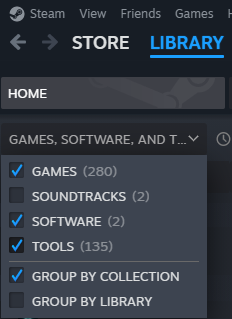
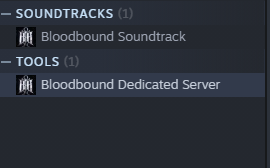
Settings
The server's settings live in \WindowsServer\Bloodbound\Saved\Config\WindowsServer\Engine.ini. Restart the server after changing them.
- GameMode: 0 = Last Team Standing, 1 = Clan Blood Match
- MapNumber: 0 = BloodAve, 1 = Club, 2 = Castle, 3 = Subway, 4 = Cemetery, 5 = Farm House
- Duplicates: 0 = no duplicate characters, 1 = allow duplicates
- Port: open port 7777 (UDP and TCP)
Example:
[ServerSettings]
ServerName=BB Server
Password=
MapNumber=0
RoundTimer=5
RoundLimit=21
GameMode=0
MaxPlayers=10
Duplicates=1
KillCap=50
SlayerBots=5
VampireBots=5
Easy Anti-Cheat
The Steam version uses Easy Anti-Cheat. To authenticate a dedicated server with it:
- Open Notepad (or any text editor), paste the line below and save it with a .bat extension, for example
AuthenticateServer.bat. - Make sure port 7777 (Unreal's default port) is open on your server.
- Read the Readme file in the dedicated server's folder for the rest of the setup.
BloodboundServer.exe -7777 -server -log -AUTH_TYPE=deviceid -AUTH_LOGIN=test -AUTH_TOKEN=testGood to know
- Leaderboards count kills between real players only, in every mode.
- Bots: on a listen server, add them in the lobby (both modes). On a dedicated server, set the bot count in
Engine.ini; when the server is full of bots, one leaves when the round starts. - Player limit: 10 players per server for now.